
Use Case: Company Name Cleaning
Writing and formatting the company name correctly is an extremely important part of your cold email.
We want to make sure that we spell & format the company name exactly how they advertise their business.
This means we want to remove things like “LLC”, “LTD,” “Pty Ltd,” “Corp,” “OÜ,” or any other unnecessary words at the end of the company name.
Imagine if your email said…
- “Hey Zach I’d love to talk about how we can help Double Your Freelancing, LLC get more subscribers!”
vs…
- “Hey Zach I’d love to talk about how we can help DYF get more subscribers!”
👆 Which of the two feels like it was written by a human and not someone who scraped a company’s legal name?
That’s why cleaning is important.
And fortunately for you, the LeadTables “AI Table Data Prompt” Data Module is a perfect mechanism for doing this!
Here’s how…
Action Steps: AI Company Name Cleaning
1 — Make Sure You’re Trained
Before you start, ensure you’ve already reviewed the basic tutorial for how to configure this Data Module.
(These steps assume you’re already comfortable with it)
2 — Add The Data Module
Go to your LeadTable where you want to add this.
Then pull up the Lead Gen Studio and add a a new “AI Table Data Prompt” Data Module.
Call it something like “Company Name Cleaner.”
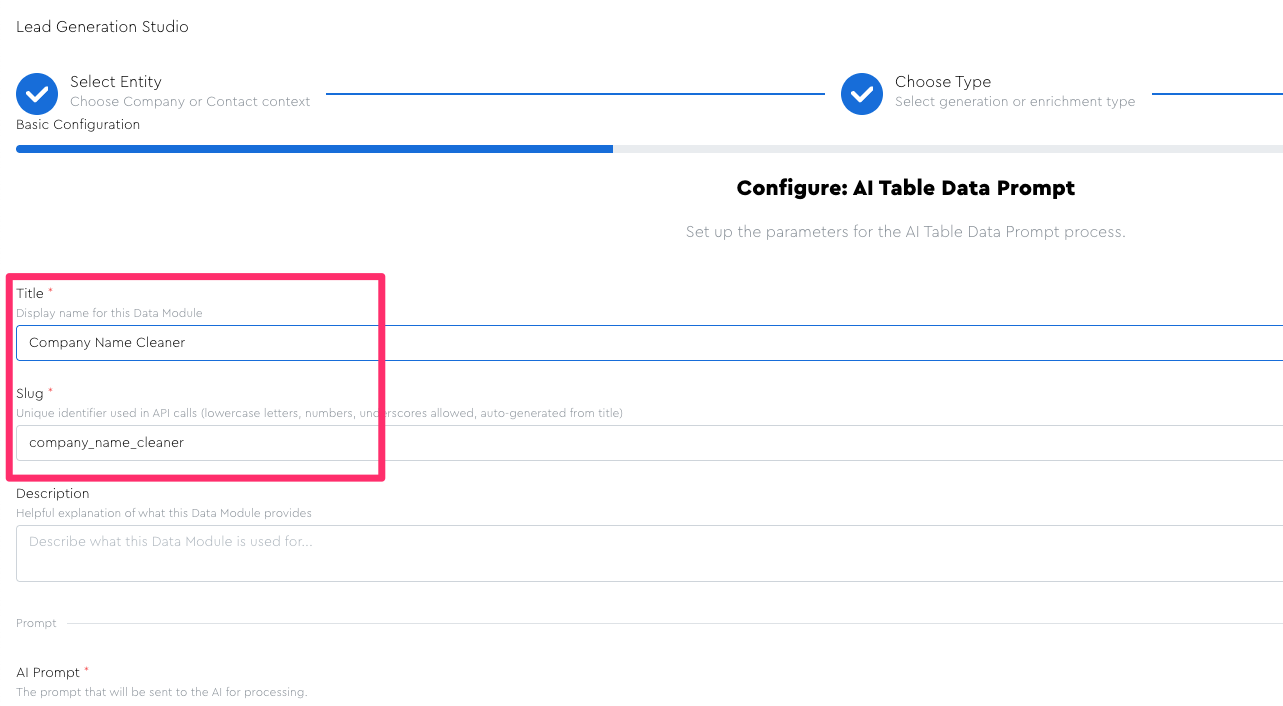
3 — Basic Config
Before setting up your prompt, I recommend setting up the following core config:
- Title:
Company Name Cleaner - Intelligence Level:
Smart - Context Size: Choose your own adventure…
Large— if planning to provide reference material like homepage markdownLarge— if planning to have it do the “acronymifying” in addition to the baseline cleaningSmall— if planning to only provide the company name & no/minimal reference material (you’ll have 70 words of context available after system instructions in the small tier)
- AI Model:
Whichever Smart model you prefer
If you’re doing simple name-only cleaning without providing reference material, you can potentially experiment with using Basic models, but be sure to test thoroughly to ensure it did things correctly. IMO this task is right on the edge of what basic models safely excel at handling.
4 — Set Up Your System Instructions
Add the system prompt below into the AI Prompt field.
Be sure to inject your fields for…
- Business Name
- Domain
- Reference Materials, if you’re using them (e.g. homepage scraped markdown)
System Instructions For The “AI Prompt” Field
Be sure to add your fields for business name, domain, and reference materials (if you’re using them, e.g. a homepage scraped markdown)
I am building a cold email leads list and I need your help "cleaning" some data based on the rules below.

I’ll first give you all the cleaning rules, then I’ll give you some data I have about this lead.

## Company Name Cleaning Instructions

We want to make sure that we spell & format the company name exactly how they advertise their business.

This means we do NOT want to include “LLC”, “LTD,” “Pty Ltd,” “Corp,” “OÜ,” or any other unnecessary words at the end of the company name.

Basically, imagine if your email said…

- “I can help Double Your Freelancing, LLC get xyz”
    - vs…
- “I can help Double Your Freelancing get get xyz”

👆 Which of the two feels like it was written by a human and not someone who scraped a company’s legal name?

 Here are some examples of different company name formats:

### Standard Formats

If you’re given only a name and no reference material, it’s generally safest to simply initial-cap the words and remove the business type qualifiers, e.g…

- Separate words, initial capitalized:
    - Frameless Interactive OÜ → Frameless Interactive

### Special Formats If Reference Material Provided

If you’re given reference material (e.g. a homepage scrape or some google search results or something), you can look for how they say their own business name, and might end up with things like…

- Two words together with both capitalized:
    - LearnSpud
- Intentionally lowercase:
    - codedamn

But again, if no reference material citation was available, we would have just played it safe and gone with “Learn Spud” and “Code Damn” — we were only able to do this because we saw it in the reference material multiple times.

## Company Name Cleaning Rules

Things to always check for:

- Capitalization (or intentional uncapitalization)
- Word spacing (or lack thereof)
- Spell-checking, if necessary (unless citation shows intentional misspelling)
- Suffix removal (LTD, LLC, etc)

**Misc Rules & Edge Cases:**

- If the company name is blank, the cleaned name should also be blank
- Always stick to “canonical citation data” to avoid hallucinations. Don’t use your training data or make guesses about special formats

## Lead Data

Here’s the info I have about this lead:

**Company name (raw; un-cleaned)**: “[[company:business_name]]”

**Domain**: “[[company:domain]]”

### Reference Materials:

**Homepage Markdown Scrape:**

TODO INSERT DATA OR DELETE THE LINE ABOVE
For reference materials, it can be helpful to review your LeadTable’s filled columns to see what might be helpful for the LLM as context, and include anything you think is trustworthy + useful.
The homepage markdown should be your primary reference material because it comes directly from the company’s own site.
You can also add trustworthy source-native or imported fields, such as a Google search description or a LinkedIn company page description, when they provide clear evidence of how the company writes its name.
🚨 Warning: If you feed in “non-canonical” (i.e. not “straight from the horse’s mouth”) enrichment data as context, make sure you trust it. You are implicitly trusting the provider’s collection method, system instructions, and model choices. When sources disagree, prefer the company’s own website and lower the confidence score.
5 — Set Up Your Response Output Fields
Configure the “Response Output Structure” to have the following fields…
Response Output Field — Company Name Cleaned
- Field Label:
Company Name Cleaned - Data Type:
Text - Include Response Explanation?
❌ No
Output Item Instructions
The cleaned company name. Leave blank if no raw name provided. Return the same name as provided if raw is already clean.
Response Output Field — Company Name Cleaning Confidence
- Field Label:
Company Name Cleaning Confidence - Data Type:
Number - Include Response Explanation?
✅ Yes
Output Item Instructions
1-10 score of how confident you are that this cleaned name is be safe to use.

Only fill this if the raw company name was provided.

10 = Almost definitely safe
7 = Probably safe
4 = Probably not
0 = Almost definitely not
Response Output Field — Company Name Cleaning Status
- Field Label:
Company Name Cleaning Status - Data Type:
Text - Include Response Explanation?
✅ Yes
Output Item Instructions
This field has 3 possible values:

- `ok` — used for correct cleanings
- `needs_review` — used when there was some kind of issue or something you’re unsure about
- `no_data` — used when no company name was supplied

For this field’s attached “reason why” field, don’t fill that for `ok` or `no_data`; only do that for the ones marked as `needs_review`.
6 — (Optional) Set Up “Acronymification” Response Output Fields, If Desired
If you want the LLM to try to make “acronymified” names (e.g. “Double Your Freelancing” → “DYF”), add the following 2 fields to the config; otherwise you can skip this step.
Notes if you decide to do this:
- Large Context Size — The extra system instructions alone will push you outside of the “Small” context window; and the reference material inclusion will do so even more.
- Choose A Smart Model — I don’t think the basic models are likely to accurately discern when to do “acronymification” vs. not, given that the decision process is nuanced.
- Include Reference Material — The best way for it to know if an acronym is safe is for it to reference a homepage scrape.
💡 The CPL impact of “acronymification” is ~$0.02 due to the above, so it’s up to you to determine if you think having acronymified company names will give you enough of a Positive Reply Rate boost to be worth the cost. (The way to know for sure is with campaign A/B tests)
Response Output Field — Company Name Acronym
- Field Label:
Company Name Acronym - Data Type:
Text - Include Response Explanation?
✅ Yes
Output Item Instructions
If companies have a longer name with 3 or 4+ words, it can be worth considering using an acronym (like “DYF” instead of “Double Your Freelancing”) to shorten it.

This comes with a few benefits:

1. We want our emails to be as short as possible. Acronyms help with this for long company names.
2. It also adds to the “personalization vibes” when you do this

BUT! Acronyms are somewhat risky because the business owner might not think of their business name that way.

If I include a scrape of their homepage in the Reference Materials, that can be useful to check.

That way we don’t accidentally do an acronym for, idk, like, the “American Space Society” or the “Farmers United Coalition of Kansas” or something 😂

(Think about what those acronyms would be and you’ll see why, ha ha)

If the company name is 2 words or less, or you otherwise deem it unsafe/not logical to acronymify, you can leave the output blank.

NB: Sometimes “acronymification” isn’t as simple as simple as just the first letters, e.g. “Boston Police Department” may go by “BPD” but they also may go by “Boston PD.” There’s no way to know which without source material. But if the homepage shows “Boston PD” all over the place, we’d roll with that over “BPD.” (However I just checked their literal homepage and it says “BPD” so if that were the actual lead, that’s what we’d do)

Other times, it's less about "acronymification," and more about "word-dropping." For example, there's a lead I saw called "Modera Wealth Management" as the "proper name" but on their homepage they say, "[...] At Modera, we understand your dilemma. We know that [...]" And thus, we know that we should shorten their name to "Modera" instead of something weird/risky like "MWM." "Modera" is sufficient for the goals of shortening, personalization, and safety, so it's the right fit.
Response Output Field — Company Name Acronym Safety Score
- Field Label:
Company Name Acronym Safety Score - Data Type:
Number - Include Response Explanation?
✅ Yes
Output Item Instructions
1-10 score of how confident you are that this acronym will be safe to use and that the lead will “get it” if we use it in an email to them.

Only fill this if you also filled the `Company Name Acronym` field. If we chose to skip the acronym, you can leave this blank.

10 = Almost definitely safe & they’ll “get it”
7 = Probably Safe
4 = Probably Not
0 = Almost definitely not

If you see the acronym used on their homepage, that’s an easy way to safely give it a 10/10 safety score. Otherwise, it’s up to your discretion.
7 — (Optional) Save Out A “Company Name Cleaning” View
I personally like to create a “Saved View” to make it easy for me to see what I want.
I hide all columns other than the ones I fed in as context, that I might thus use to assess the accuracy of the cleaning without having to pull up the website.
I usually pin left the Domain column, and pin right the…
Cleaning ConfidencecolumnRaw Company NamecolumnCleaned Company Namecolumn
Then use the “middle area” for comparing the scores and results to source data.

8 — Donezo
Finish up saving out your data module config, then run it and test it in the same way we always do.
(Reference the “The “1 → 3 → 10 → 30 → 100” Framework & “Rule of 30” When Testing” lesson if you’re not familiar with the standard incremental testing process.)