
Exporting A Campaign’s Leads
When you’re ready to export your leads for sending emails to, start by navigating to your Campaign Contacts grid.
Before you export, I recommend you apply some basic filters to your grid, such as:
- Not unsubscribed
- Email is verified
- All required fields for sending are present and not blank
I’d also recommend you hide columns you don’t need for your sending platform / email copy injection, and save this out as a “campaign exporter” view.
From there, simply click the export button on your Campaign Contacts grid:
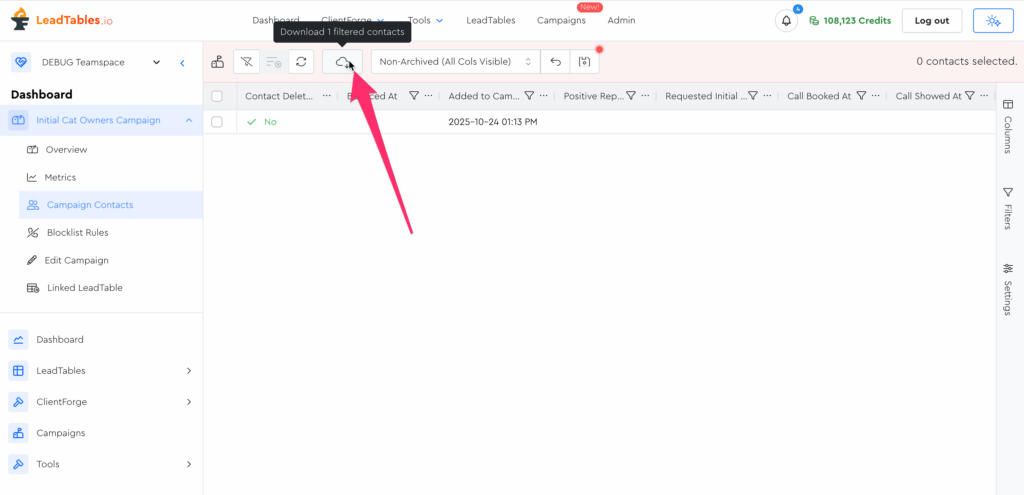
At the time of writing, downloading from here is basically the same as downloading your leads from a LeadTable, but long-term I plan to layer some smarter functionality here and perhaps even support directly adding your leads to your sending platform via API, so it’s good to get in the habit of exporting from here rather than from your LeadTable contacts view, even if they currently appear to function similarly.
FYI, I’ve found that these tend to be the best export popup settings:
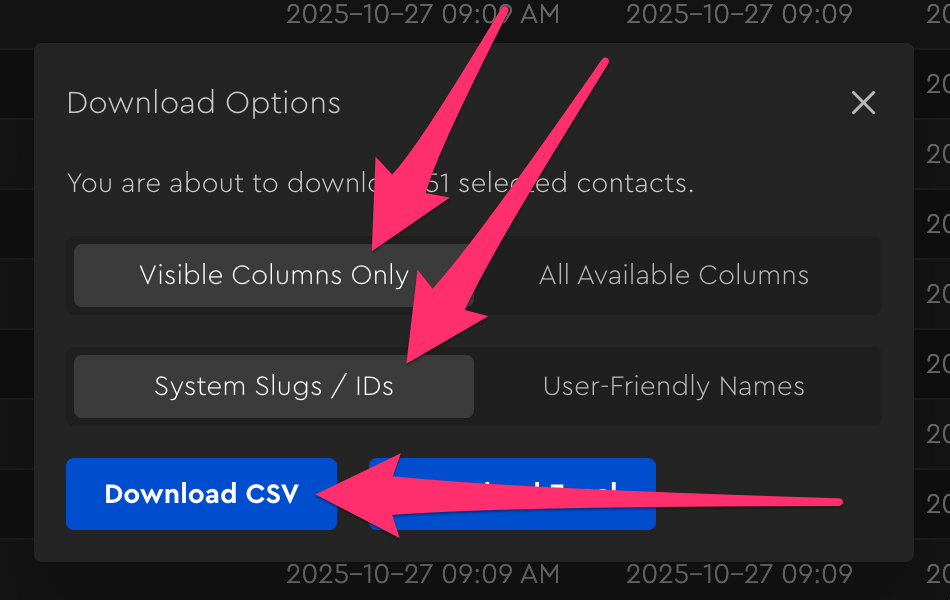
(Normally I prefer exporting to excel, but at least in the case of SmartLead, they only allow you to import CSVs)