
How To Plan New Campaigns
Campaign planning is primarily covered in $200k Freelancer since it’s more of a “strategic thing” than a “technical thing.” (If you’re a $200KF student, this is covered in the 📮 Campaign Strategy module)
BUT given that we need to create a campaign for our learning examples here, we’ll make one and do just some basic config 🙂
To get started, go to the Campaigns section of the site, then click the “Create New Campaign” button:
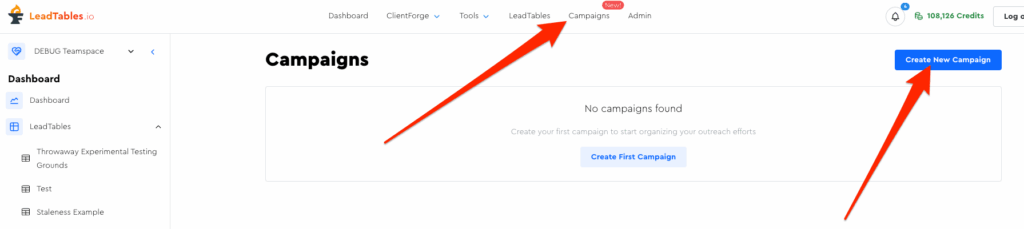
We’ll build on the example leads we’ve been using all throughout the course for our campaigns (so things might seem odd to you if you skipped straight to this section, ha ha), and we will create 2 campaigns for learning purposes.
For this first one, let’s call it “Initial Cat Owners Campaign” and save it:
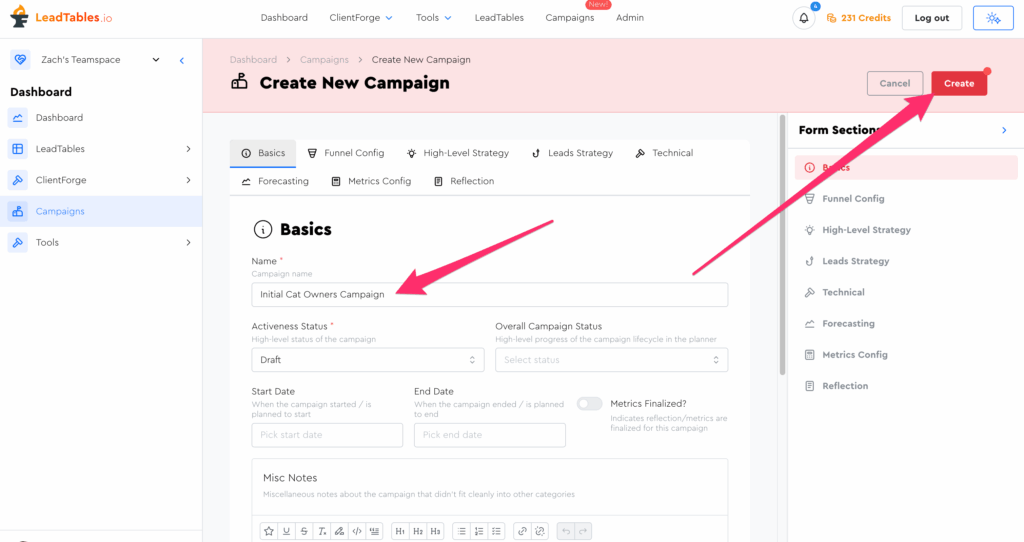
Then go back to the campaigns page and make another one called “Initial Dog Owners Campaign” and save it.
If you go back to your campaigns list page, you should now see them both:
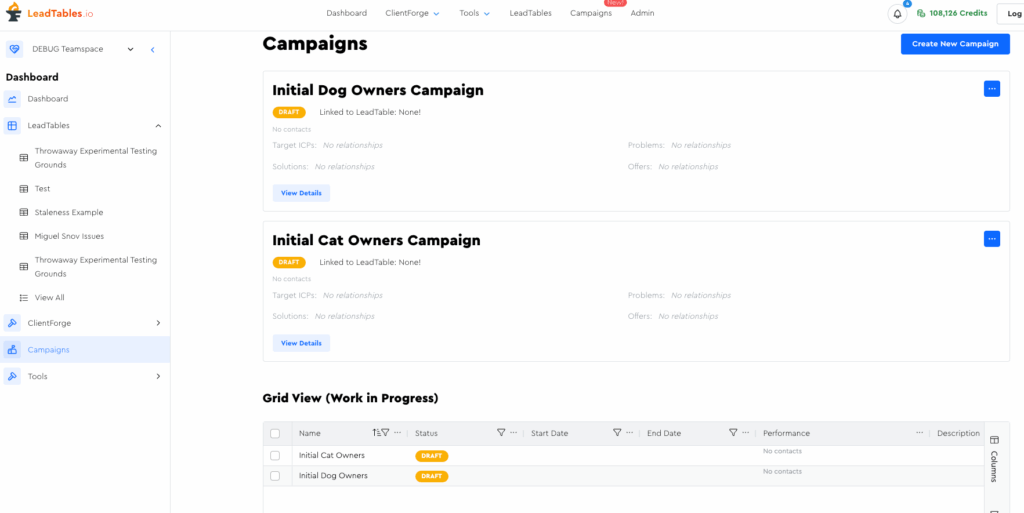
Now lets edit the cat owners one, just so I can walk you through it and explain some of the key areas of the planner.
Key Areas of the Campaign Planner
I’ll explain the non-obvious fields in each tab; the others should be pretty intuitive.
Basics Tab
- “Activeness Status” vs. “Overall Campaign Status”
- Activeness Status — For tracking whether or not the campaign’s running, basically. It’s used for me to know how to display things to you in the UI.
- Overall Campaign Status — Mostly just for you personally to keep track of where you’re at with your planning.
- “Metrics Finalized” toggle
- Don’t toggle this on until you’re sure you’ve actually loaded up all your final campaign interactions and metrics (more on this in an upcoming lesson)
- I use this status to show you a disclaimer when viewing campaign stats (e.g. in the campaigns grid) that the stats aren’t finalized, and thus, if one of your campaigns with un-finalized stats appears to be converting at like 3x your other campaigns, that might not actually be true 🙂
Funnel Config Tab
This tab allows you to configure your phasic funnel conversion flow — we’ll do a deep dive into it in a standalone upcoming lesson.
High-Level Strategy Tab
Explained in $200KF. I believe in the 📮 Campaigns Module.
Leads Strategy Tab
Explained in $200KF in the 🎣 List-Building Module.
Technical Tab
If you want a useful centralized place to keep track of your sending infrastructure etc. for this campaign, you can do it here.
Forecasting Tab
This tab allows you to make projections of how many leads & clients you can expect your campaign to get you. We’ll talk about this in an upcoming lesson.
Metrics Config Tab
This tab allows you to set which metrics you’ll enter counts manually for instead of tracking interactions for the individual leads. We’ll talk about this in an upcoming lesson.
Reflection Tab
Useful to fill out after your campaign’s over, when planning how to iterate for your next campaign. We cover this in $200KF in the 📮 Campaigns Module.