
Core Concept: Unique Identifiers
In a moment, we’ll build on your knowledge from the manual lead-adding exercises with proper leads list spreadsheet uploading.
But before we do, it’s important that you understand the concept of “unique identifiers” in LeadTables.
What Unique Identifiers Are For
Unique identifiers are important for data matching when adding enrichment data, and when associating contacts with companies.
Enrichment example…
- You have 10 companies in your LeadTable already
- You download those 10 leads and run them through an external tool to find their annual revenue, or employee count, or whatever
- Now you want to add that new data to your pre-existing leads in LeadTables to help you ICP filter them
👆 In order to “get that data onto” your pre-existing leads, we need to map it into them with a shared unique identifier that’s present in both your LeadTable AND the enrichment data spreadsheet you’re uploading.
For example, if all the leads in your LeadTable have domain names, and your exported “annual revenue enrichment” csv also has domain names, we can match on that domain as the unique identifier to merge your new data into your pre-existing rows, while maintaining all of the other pre-existing enrichment data those leads already have in LeadTables that’s NOT present in your new sheet.
This makes enrichment realllllyyyy easy and convenient for you.
Company unique identifier options are:
- Domain Name (e.g.
leadtables.io) — Preferred option; most reliable - LinkedIn URL — LinkedIn is pretty strict about not allowing companies to have multiple LinkedIn profiles, so if you don’t have domain names for your leads, this can be a viable option, even if not ideal.
- Website URL (e.g.
https://leadtables.io) — Not recommended due to slight differences that may happen from different enrichment operations- NB: LeadTables auto-normalizes uploaded URLs into domains for you to help you ensure you don’t upload the same company times. So even if you upload a lead with a website url of
https://[leadtables.io](<https://leadtables.io>)/clientforge/niches?utm_campaign=whatever, it will still save the domain asleadtables.ioto make your unique-identifier-matching life easier 🙂
- NB: LeadTables auto-normalizes uploaded URLs into domains for you to help you ensure you don’t upload the same company times. So even if you upload a lead with a website url of
- Business Name — Not recommended due to slight differences that may happen from different enrichment operations
Contact unique identifier options are:
- Email — Preferred option
- LinkedIn URL — Okay backup if nothing else available
NB: It’s Your Responsibility To Dedupe!
At least as of now, I don’t think it’s the right call for me to force you to only have one record per unique identifier in a table.
So if you wanted to, you could technically go into your test table and add more contacts to your existing companies that are duplicates of previous ones:
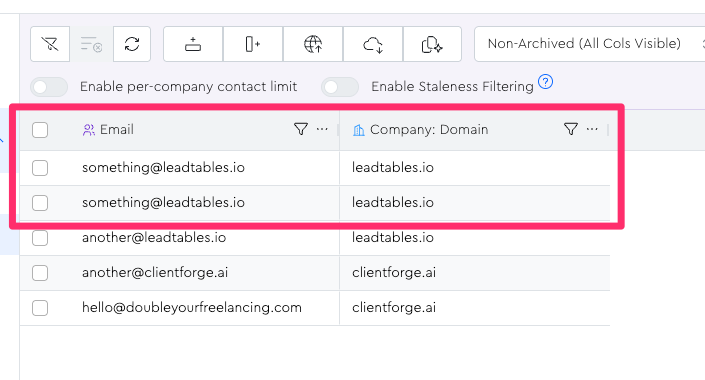
When you’re uploading lead data, I have tooling built in to the platform to help you avoid this, but it’s technically allowed for now because there may be certain scenarios where someone could want an email or domain in their table multiple times for different leads.
The important consideration though when running tables with duplicate leads comes back to “unique identifier matching.”
If you were to upload enrichment data for this duped contact, LeadTables will search the table for the first match and add the data to them, meaning that you now have one lead with the enrichment data, and one lead that never got it added.
Because of this, it’s best practice to ensure you dedupe your master list on LeadTables prior to uploading enrichment data, which we’ll talk about in an upcoming lesson.
Let’s Import Some Leads To See Unique Identifiers In Action!
In the next lesson, you’ll learn how the LeadTables uploader works for using unique identifiers for mapping, as well as intelligent merge modes to avoid ever getting duplicate records in the first place.