
Organizations vs. Teamspaces
In LeadTables, you’ll notice that you belong to a teamspace and an organization.
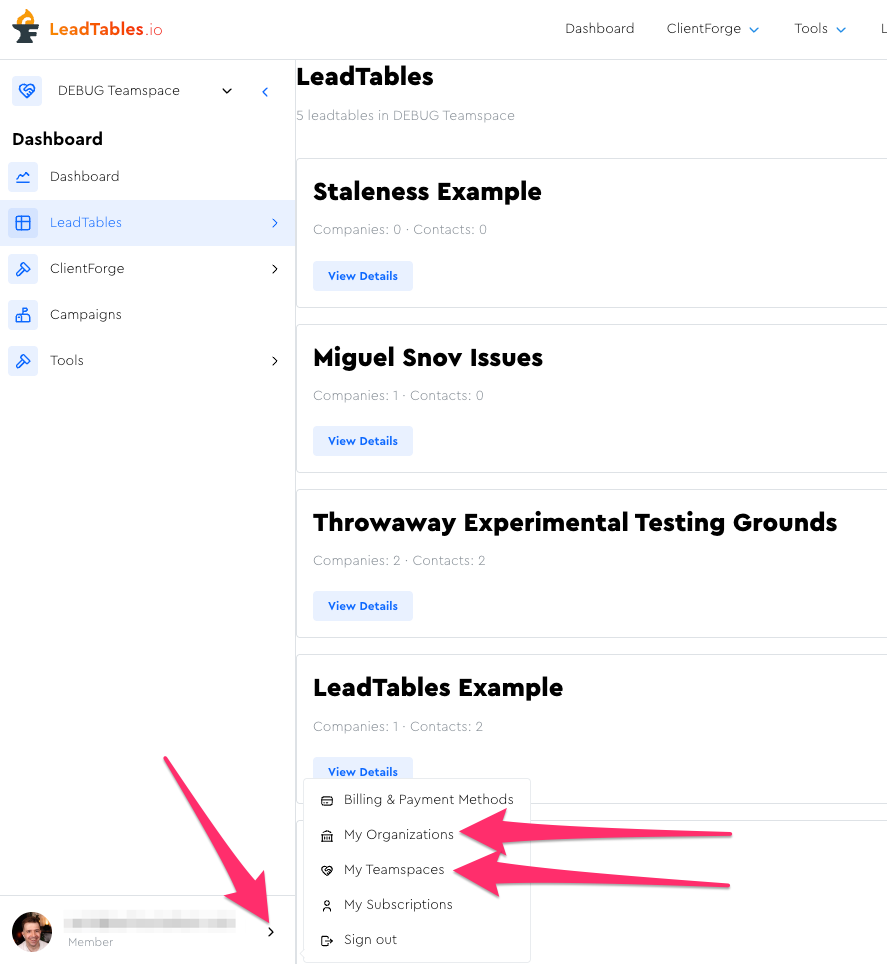
The reason for this is to make the platform agency-friendly and multi-business-entity friendly.
Here’s how it breaks down…
Organizations
Organizations are the highest-level entities, and they’re what…
- Payment methods get attached to
- Quotas are calculated against
- Subscriptions are attached to
Organizations can contain multiple Teamspaces.
They do not directly “own” any of your LeadTables etc. though, the happens through Teamspaces…
Teamspaces
Teamspaces can contain multiple LeadTables, ClientForge pages, Campaigns, etc.
The nifty thing about them is allowing you to manage granular user access permissions.
If you want to give someone (e.g. a client) access to tables in one teamspace, without getting access to your entire org’s, you simply add them as a teamspace member to that teamspace, and create different teamspaces for your other clients, thus keeping everything nicely siloed-off.
Notes about “teamspace-wide” scope:
- Blocklists/unsubscribe lists are attached to a teamspace and apply to all LeadTables within (more on blocklists later)
- Campaigns, ClientForge pages, etc. all belong to a teamspace
- LeadTables all belong to a teamspace
LeadTables
While you can make multiple LeadTables per teamspace, it’s generally best not to, other than for perhaps having one table as a throwaway testing ground for enrichment strategies before you roll them out to your main table.
Here’s why it’s generally best to stick to one LeadTable per teamspace…
- Deduping happens per table
- There is a 1:1 relationship between Campaigns & tables; you can’t add leads from multiple tables to a campaign
- Keeping your life simple and easy; no wondering which table a given lead lives in
- Managing & tracking lead interactions — if the same contact lives in two tables and you mark one as having positively replied to a cold email or as requesting a lead magnet, that info wouldn’t carry over to the version of them in the other table
Real-World Example: Freelancer
If you’re a freelancer, your stack is simple:
- Org: Zach The Freelancer
- Teamspace: Zach The Freelancer
- LeadTable: Zach’s Master Leads List
- Teamspace: Zach The Freelancer
Easy peasy.
Real-World Example: Agency
If you run a cold outreach agency called “COOL Outreach” (see what I did there?) your stack will look more like this…
- Org: COOL Outreach
- Teamspace: COOL Outreach Internal
- Table: COOL Outreach Master Leads
- Teamspace: Client 1
- Table: Client 1 Master Leads
- Teamspace: Client 2
- Table: Client 2 Master Leads
- Teamspace: COOL Outreach Internal
By organizing this way, you can keep all of Client 1’s unsubscribes, campaigns, and leads siloed-off just to them, not affecting your other clients, while you still pay for their leads and such, and manage your own cold outreach campaigns in your own teamspace without muddying it up with client data.
If you wanted your clients to pay for their own leads & LeadTables subscriptions, you’d probably want to have them sign up for their own accounts, make their own organizations, and invite you to either the org or teamspace as an admin.
Real-World Example: Zach
I, Zach, am involved in a few businesses:
- Double Your Freelancing (Courses)
- LeadTables (SaaS)
- Conversion Wizard (CRO Agency)
If I want to foot the bill for all of them but separate the leads, unsubscribe rules, etc., my breakdown would look like this:
- Org: Zach
- Teamspace: DYF
- Table: All DYF Leads
- Table: Experimental Testing Grounds
- Teamspace: LeadTables
- Table: All LeadTables Leads
- Teamspace: CW
- Table: All CW Leads
- Teamspace: DYF
(And that’s exactly what my breakdown DOES look like!)