
The “Favorite & Archive” Actions
The “🗃️ Archiving” & “⭐ Favoriting” actions are meant to give you a quick way to say:
- 🗃️ Archive — “I hate you, get out of my sight forever you stupid lead”
- ⭐ Favorite — “I love you and probably should do a good job making sure my personalization etc. is good for you, you smart amazing beautiful lead”
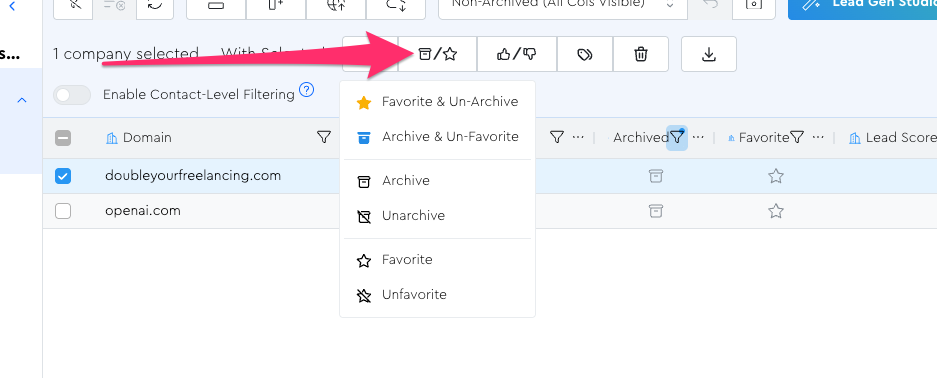
You can mark them with the action bar actions in bulk, or if it’s just for one lead at a time, you can click the icons in the grid directly:
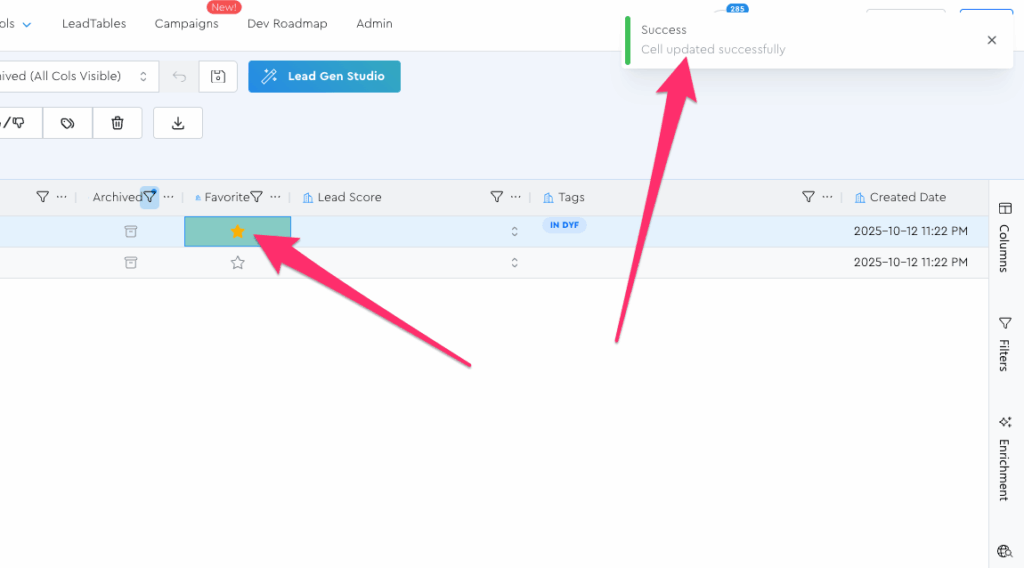
Note that by default, archived leads are hidden from views.
The Bulk Actions
There are 6 bulk actions in this menu; here’s when to use each:
Recommended Actions:
- ⭐ Favorite & Unarchive — It’ll mark this lead as a favorite, and if they’re currently archived, it’ll un-archive them
- 🗃️ Archive & Unfavorite — The inverse of the above
Not-Usually-Recommended Actions:
- The other 4 (archive, unarchive, favorite, unfavorite) don’t control the opposite state, so be careful about people who you accidentally wind up having marked as both “archived” AND “favorite” if you use these. (Because it’s kinda confusing for a lead to be marked as both at once, yaknow?)
Why Archive Vs. Delete?
Archiving is what’s called “soft-deleting.”
A.k.a. hiding the data but still keeping a record.
Whereas “actually-properly-deleting them” is what’s called “hard deleting.”
The problem with hard-deleting is that if you were to hard-delete a lead, the LeadTables software would have no way of remembering your hatred for them, because there’s no record of them anymore.
(And if there’s one thing all therapists agree on, it’s that you need to hang onto your hatred, and carefully catalog and index it for easy retrieval in the future.)
If you hard-deleted them, you might later import them again without realizing your hated them, whereas if you simply archive them, you won’t keep adding them back to the table in a fresh state in subsequent list-building operations.