
Honing & Debugging Your Prompts
Most of the work of scaling AI prompts to be solid enough to run on your entire leads list comes down to “consistent trustworthiness.”
If you provide the right context, keep your scope zoomed in, and choose the right model, you can do some amazing things with AI.
But it does take work, testing, and iteration to get there. You don’t just type in the first prompt that comes to mind and float off into the land of happy sunshine and rainbows (at least I don’t).
For me, the process is more like…
- Try the first prompt
- Run it on 3-10 leads to test initial output, per the scaling frameworks we talked about earlier
- Look closely at aspects of the output that are different than expected, or different than what I would have done/said
- Adjust my prompt to see if we can improve those parts
- Scale it up a bit further and make sure I’m testing it on some “harder” and “weirder” leads
- Keep iterating until solid
Often it will take me 1-4 hours to dial a solid prompt, depending on complexity.
To aid your debugging and honing, you can go to the jobs page after running a prompt to see debug output for the first record from your job (I don’t log all of them because I don’t want to bloat my database with these large logs):
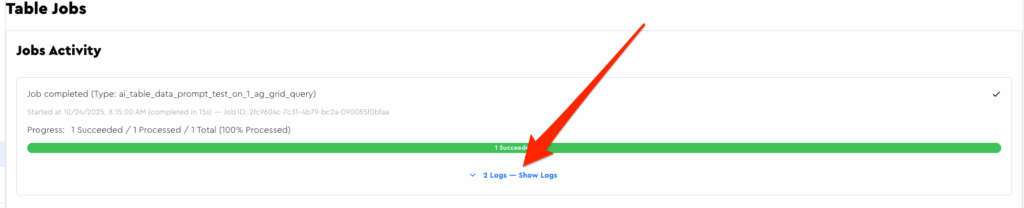
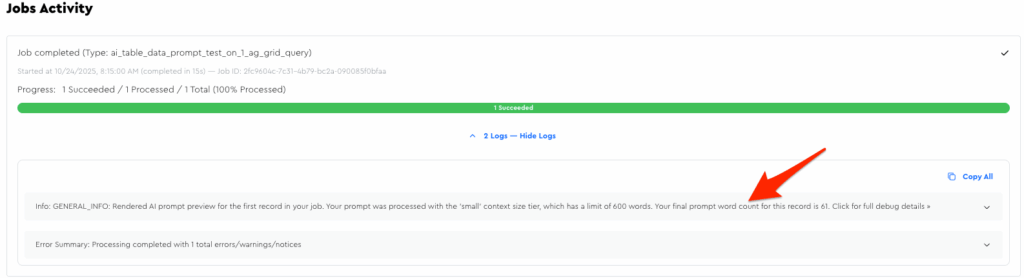
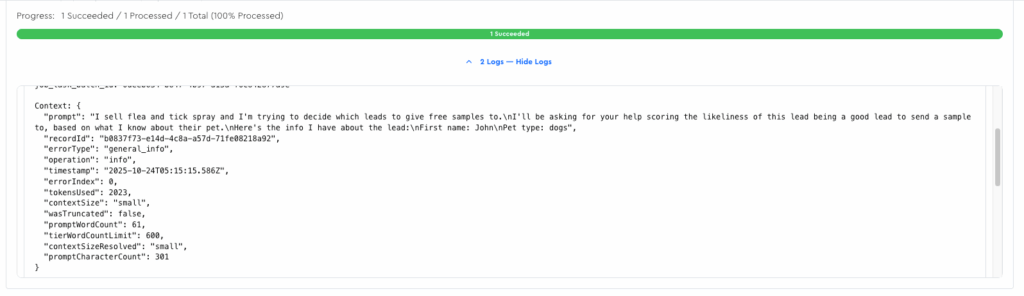
Within there you can see useful stuff, like word count, your rendered-out prompt, etc.
(If there are other things you wish were included there, just let me know)
Debugging & Improvement Tips
Tip: Create “Debug Output” Fields
If you’re wondering why Chap did what he did for your prompt evaluation, remember that you can always just literally create output fields to find out!
For example, I made these:
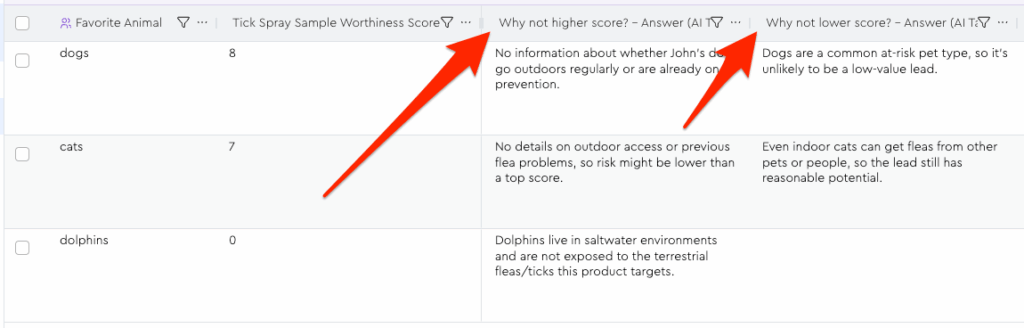
Those fields give me useful information that I can use to hone my prompt, e.g. I might adjust my prompt to say we don’t need to factor in “uncertainty of this specific pet’s outdoor access” since we’ll never know, and instead go off of generalizations of what’s common for the pet type.
This would likely result in more 10s, and in a situation where 7s are 7s for some other reason, e.g. pets like ferrets that would never be taken outside or something.
NB: If you add “debug” / “dev” fields like this, it would probably be smart to remove these once the prompt is dialed-in, for reasons I’ll cover in the next tip.
FYI, Here’s how I set up those fields from the screenshot above:
- Field Label: Why not higher score?
- Field Slug: why_not_higher_score
- Data Type: Text
- Output Item Instructions: “Short sentence explaining why you didn’t give a higher tick_spray_sample_worthiness_score. Leave blank if N/A.”
- Include Response Explanation: 🚫 Toggled off (since it is already itself a kind of explanation!
- Field Label: Why not lower score?
- Field Slug: why_not_lower_score
- Data Type: Text
- Output Item Instructions: “Same deal as
why_not_higher_score“ - Include Response Explanation: 🚫 Toggled off (since it is already itself a kind of explanation!
Tip: Be Careful About AI Data Module Scope
LLMs perform best when they have tight, discrete jobs to do.
As a rule, two separate AI Data Modules doing their own thing will perform better than one module trying to do 2 things.
BUT it’ll also cost you 2x as much since you have to pay to run each; so you have to find the balance.
Here’s what I ask myself to make the decision of together/separate…
“Are my various output fields extensions of the same task, or are they different tasks?”
In the example we’ve been working on in this module, our various output fields are all tied to that core ICP assessment. They’re just different facets of it.
And thus: pretty safe to keep joined.
Where things would get risky is if, in the same prompt, we wanted Chap to also analyze their homepage and extract a testimonial.
Now we’re blending two separate types of “tasks to be done” – each of which requires different input context to succeed and spits out different output – and I’d wager that the output of each would suffer as a result.
Tip: Be Mindful Of Output Tokens
The most expensive aspect of frontier LLM models is their “output tokens,” i.e. how long their responses are. (For example, GPT5’s output tokens cost 10x what their input tokens do!)
I don’t charge you based on output tokens, but to keep the price for you as reasonable as possible, I do limit the output tokens for each AI Data Module to 400 tokens (~300 words).
So what this means is that if you create 10 output fields, each of which has its own “response explanation” toggled to “on,” each field will only get 30 words, divvied up between the explanation and output.
(The LLM will divvy up your tokens however it chooses, and it may well choose to just skip certain output fields!)
The “response explanation” field will eat up output tokens if you have a bunch of them enabled, so I recommend only using it when actually necessary — especially if you have a lot of output fields for this data module.
NB: “Output repeater field count” is not necessarily the enemy here!
It’s more about “what each one contains” more so than “how many there are.”
For example, suppose you’re doing something like list cleaning, where you clean the business name, the person’s name, and some other spelling/grammar things.
You might have like 10 output fields in your repeater, but none will have the response explanation enabled and you’ll be well within that 300 words without any imposed truncation happening.