
Finalizing Our AI Module Repeater Fields
Where we left off, we’d created our new AI Formula Data Module, but didn’t yet configure the instructions in the repeater fields. That’s what we’ll do here.
First up, ensure you have the “Tick Spray Lead Magnet Worthiness” data module pulled up in the Enrichment Tool Panel on your Contacts grid, and probably drag the left side of the tool panel to make it wider:
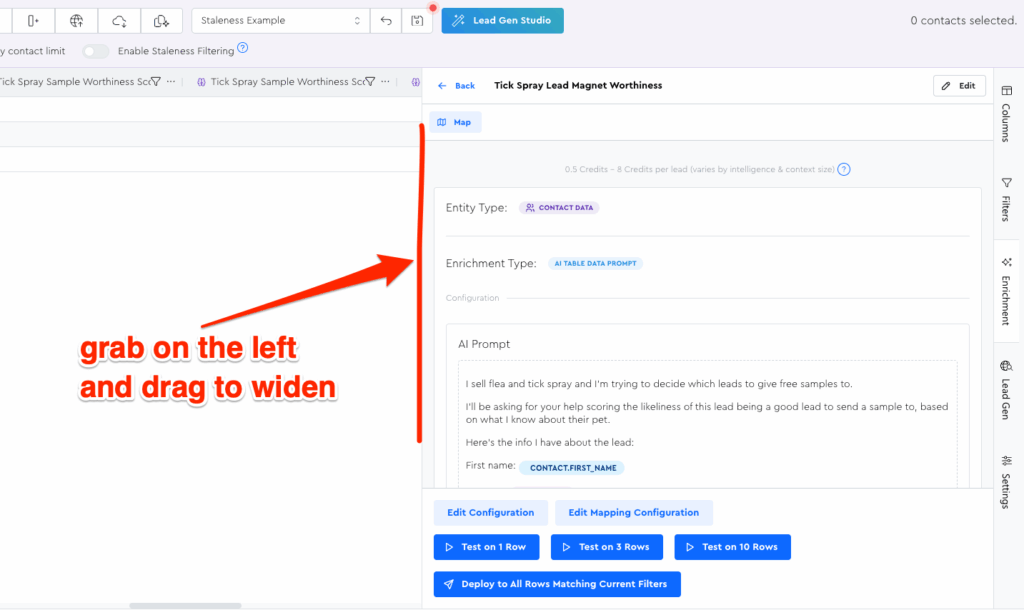
Then click “Edit Configuration” at the bottom and you should see the config form.
At this point, we already have the AI prompt field filled out, which is essentially the “system instructions.” Next up, we need to configure the output field instructions.
What Goes Into The Main Prompt Field Vs. Output Field Instructions?
My mental model for deciding is this:
- The main “AI Prompt” field is the overall “project brief” — it gives the LLM everything it should need to understand what we’re doing, what lead we’re doing it for, etc.
- The Output Instructions fields explain how to create a specific zoomed-in aspect of the response based on the data from the main “AI Prompt” field.
Let’s Learn By Doing!
I think it’s easier to learn by doing for this kind of thing, so let’s just dive in.
Repeater Field 1 Config (“Tick Spray Sample Worthiness Score”):
First up, paste the following snippet into your “Tick Spray Sample Worthiness Score” “Output Item Instructions” field:
A score 1-10 of how worthwhile this lead is to offer a free sample to. My best customers have pets that go outside regularly, but even indoor pets can get fleas, so that's not a hard limit. The main thing here is that we don't want to offer flea/tick spray samples to pet owners whose pets could never feasibly get them.

Common scores:
0 — almost definitely a bad lead; pet could never get them
10 — almost definitely a good lead; pet likely at risk if untreated
7 — probably a good lead; pet feasibly at risk if untreated
4 — probably a bad lead; uncommon for this type of pet to be at risk
You can leave the optional fields at the default.
💡 Pro Tip! For scoring like this, I like to be sure to include “almost” for 10 and 0. If you don’t include “almost,” the LLM might be hesitant to ever score leads there.
Repeater Field 2 Config (“Gain-Based Hook Seed”):
For the “Tick Spray Sample: Gain-Based Hook Seed” instructions, paste:
A very short "hook seed," a.k.a. "fundamental foundation of a sales argument" that's rooted in "Gain" / positive outcomes as the motivation.

No need for a full sentence here, and certainly no need to write an actual sales hook or full swipeable line.

Instead, I'm looking for something I can use as a note later when planning my line, e.g. "pets treated live xyz% longer according to blah blah source," or "peace of mind because you know they're protected" or whatever.

Make sure your assertions are rooted in fact and not hallucinations. I'd rather have a fluffy emotional one than a supposedly-fact-based on that's not true.

If you're able to have your specific hook rooted in this specific pet type, that's even better for the specificity factor, vs. generic stuff that would apply to all types of pets.
For this one’s “Example Context and Responses (Optional)” let’s also fill that out with:
👎 Example of BAD (too much text; too much like a "real sentence"; also a B.S. fact I just made up): "Did you know that on average, dogs' breath actually gets less stinky when preventatively treated? Happy to send you a sample!"

👍 Example of GOOD (short "seed" we can use later): "10% Less stinky of breath according to XYZ study from realplace.com"
Repeater Field 3 Config (“Fear-Based Hook Seed”):
And then finally, for the “Tick Spray Sample: Fear-Based Hook Seed” instructions, let’s just do:
Same deal as `tick_spray_sample_gain_hook_seed` except rooted in fear as the motivation & avoidance of loss/pain.
With all this done, update the data module.
And now magic moment drumroll please 🥁…..
Let’s Run This Puppy!
I am personally excited because I haven’t run this yet and I’m curious how it’ll turn out. Let’s deploy it to the 3 leads in one go:
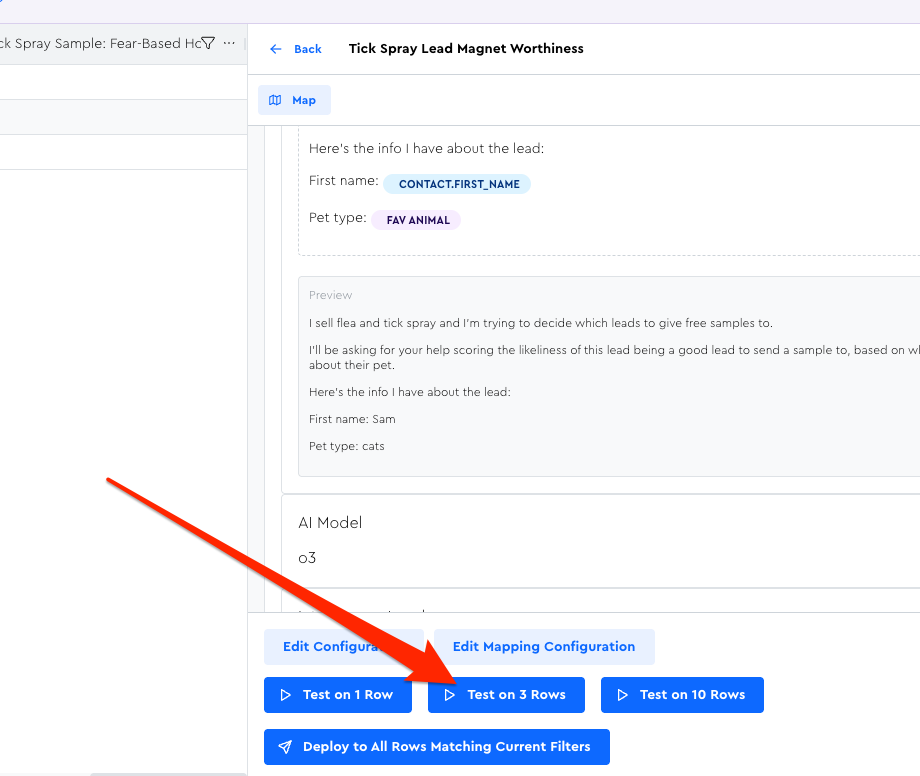
While it runs, it might be smart for you to go into the Columns Tool Panel to adjust your visible columns, the Settings Tool Panel to increase row height, and maybe even Save a View for easily recreating this display later.
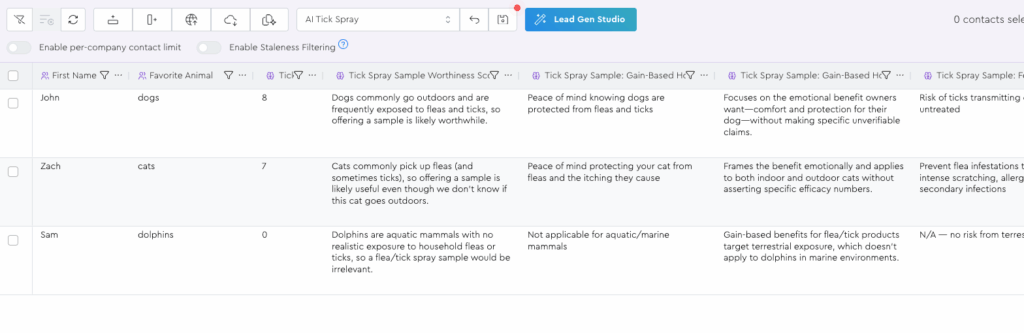
Once it’s done running, you should see this beautiful AI Gold in your grid:
General Notes For AI
As with all things AI-related, the quality of your prompting is a huge deciding factor for your results.
I strongly believe that investing time into learning how to write solid AI prompts – and learning about the strengths & limitations of LLMs – is hugely important for any business owner or knowledge worker in this new AI era that we all have to live in whether we want to or not.
Example of why it’s important: looking at the prompt above as someone with a bit of experience with AI, I recognize that probably the biggest risk factor here is going to be the citations for the hooks.
Even though I told it not to hallucinate, LLMs are gunsta hallucinate because that’s what they do.
The primary ways I know of to avoid hallucinated citations here would be to either…
- Include stats and research inside your system prompt and instruct it to only pull from here (and to ignore its training data), and to pull whatever feels most relevant for this pet type, and to just say something emotionally-driven if none feel relevant. You could even number them and have a separate output field for noting which number it pulled from, to help with reinforcement.
- Use the “AI Researcher” Data Module in LeadTables to have it do actual research — but IMO that’s risky here still (think: blog posts from random unqualified people etc. as the citations), and it’s also more expensive, so most likely it’s inferior to just adding more curated-and-approved-by-you context to draw from.
In the next lesson, we’ll look at how you can hone and debug your prompts in LeadTables as you’re working on them and getting them ready to deploy to your entire leads list.