
The “Google Search Lead Finder” LeadTables Data Module
The “Google Search Lead Finder” Data Module is hugely powerful because it can get you a TON of leads on the cheap.
If you haven’t played with the “Creative Google Search Query” Ideator AI Assistant yet (linked above), I would recommend you do so before trying to develop a strategy here.
How It Works
When configuring the Data Module, you can…
- Enter in however many separate search queries you want, e.g.
Financial Advisors in the Upper East Side, NY,Financial Advisors in Brooklyn, NY - Choose a length of time (in months) to iterate results through, e.g.
60 months - Choose how many search result pages to scrape leads from for each query, e.g.
20 pages
The Data Module will then…
- Execute each query
- Multiplied by however many months
- Multiplied by however many pages of search results per month query
Many single-month queries can yield 50-200 good leads!
Why It’s Awesome
There are 3 “multiplying effects” at play here:
- The number of queries
- The amount of months
- The amount of results pages
Here’s what this means in practice…
potential leads found = queries * months * pages * 10
So suppose you’re trying to find dentist offices, and you have these settings…
- Queries:
"patient forms" "dental office""new patients" "our dental practice""meet our dentist"
- Start date:
- today
- Months
- 60
- Results pages
- 20
This means when you click “Go,” the Data Module is going to run month-by-month queries iterating by years backwards in time starting from today.
So if today is Dec 2025, that means we’ll be querying from Dec 2020 – Dec 2025.
In this case, that means 3,600 separate google search queries get run (60 months * 3 queries * 20 pages).
Each of these queries could yield up to 10 leads.
So this one simple config could get you up to 36,000 leads, in theory!
INSANE!
In reality, when considering deduping of results etc., it would be less, because…
- Not every query will have 200 results
- As you iterate more, you will get more dupes
That’s why if you look at the data module config, you’ll see estimates like this:
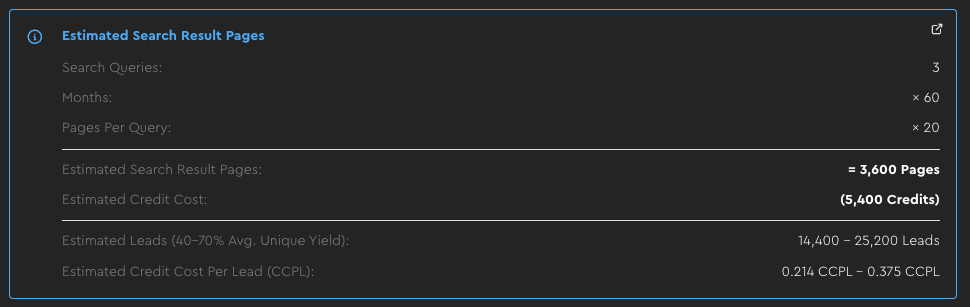
So in other words, you could run this query to get around 20k leads for a tiny fraction of a cent each!
Output Fields:
Website Domain(text) — The lead’s domain (great for deduping, filtering, and downstream enrichment).Page Title(text) — The title of the specific result page (useful for QA and quick filtering).Description(text) — The search snippet/description (often contains strong “what they do” signals).Emphasized Keywords(text) — Keywords that Google highlights in the snippet (handy for quick keyword filtering).Specifically-Indexed URL(text) — The exact page that showed up in results (useful when you want to visit the page or scrape it later).
Configuration:
- Search Queries: The queries you want to run (more good queries usually beats making one query too broad).
- Months: How far back to search. More months = more leads, but with diminishing returns due to repeated listings.
- Search Result Pages Per Query: How deep to go per month/query. More pages increases volume, but relevance often drops as you go deeper.
- Start Date: Where to begin the time window (most people start from “today” and iterate backward).
- Country: Where the search is based (this affects what results you see).
- Merge Strategy: How to handle leads that match the same company/domain more than once.
Data Quality Considerations:
As the number of months you iterate through grows, you will see diminishing returns on the yields, due to websites showing in the listings repeatedly.
- To defend against this, you can broaden your reach by adding more different queries with each iterating for fewer months.
As the number of search result pages to scrape increases, the lead quality will likely worsen
- To probe for this, you can simulate with manual google searches first to see how many pages of leads it takes before quality starts to dip
- To defend against this, you can scrape fewer pages deep, across more months and more queries
Current Data Provider:
This module is currently powered by the Apify Google Search Scraper, with LeadTables managing all of the “lead explosion orchestration” that makes it possible to generate so many leads this way.
Real-World Example: Dentist Leads
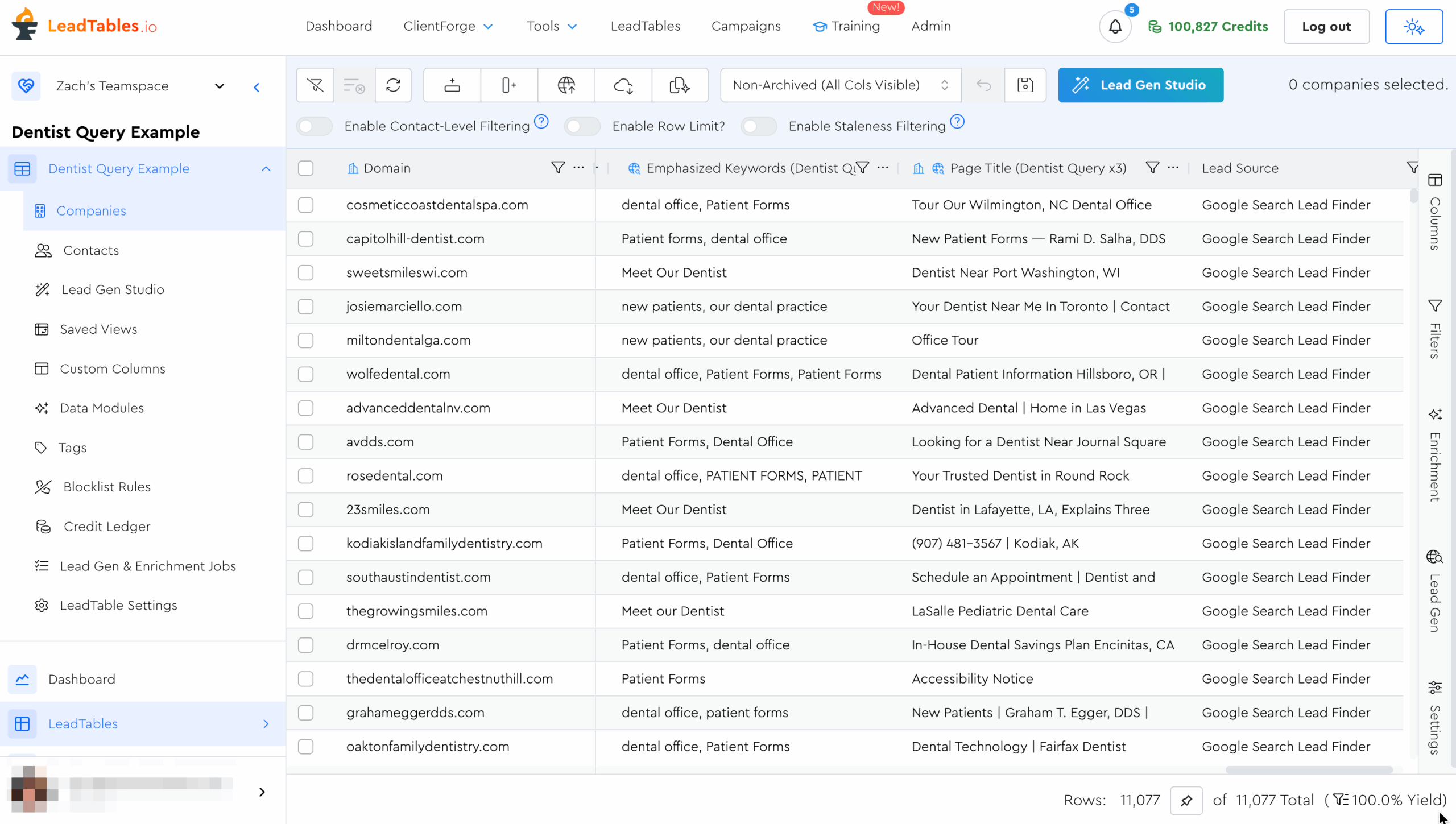
Out of interest, I ran the example Dentists Query from above. Here were the results:
- 3,600 queries
- 25,362 raw results
- 11,077 unique results (43.7% yield)
Considering that they’re going back 5 years each, having that 43% yield is pretty amazing, in my opinion.
We still need to ICP filter them, but I nonetheless thing it’s pretty amazing to be able to get so many raw in-niche leads off of google from so few queries!
In my case, well over 80-90% of my queries were indeed dentist offices, so the big step from here would be filtering by “successfulness” if that was something that mattered for my funnel.
Google Search Lead Filtering Tips
When you’re doing this “creative querying,” your big constraint will be ICP filtering.
There’s very little “on-platform data” you’ll get from Google to ICP filter by.
The typical flow for ICP filtering Google Search leads looks like…
- Get your leads
- Possibly exclude some based on whitelist/blacklist words in their search description or page title
- Then, either have AI analyze search description to ensure they match your niche
- OR Do some other steps first to make sure they match your ICP’s Economic Fit criteria, then scrape their homepage and analyze that later with AI to check for Niche Fit / Problem Fit.
Because of this, the more you can structure your queries in such a way that anyone showing up in them is necessarily in your ICP, the better.
(This is where the “Creative Google Search Query” Ideator AI Assistant from the 200KF Tool Vault is nifty — I linked it directly at the top of this page in case you’re a non-200KF student and don’t have access)
If you’re not able to get your baseline queries dialed to 70%+ good-fit lead yield, you may find that your final “Enriched And Filtered Lead CPL” is higher than it would have been with a different, more lead-gen-native lead source.
How To Navigate ICP Filtering Here
1 — Filter Out Obvious Trash With On-Platform Filters
There are certain things you can filter out based on keyword presence in the domain, description, or page title.
For example, if I want to find independent financial advisors who aren’t part of a big chain like Edward Jones, I could do that as a filter on the domain field:
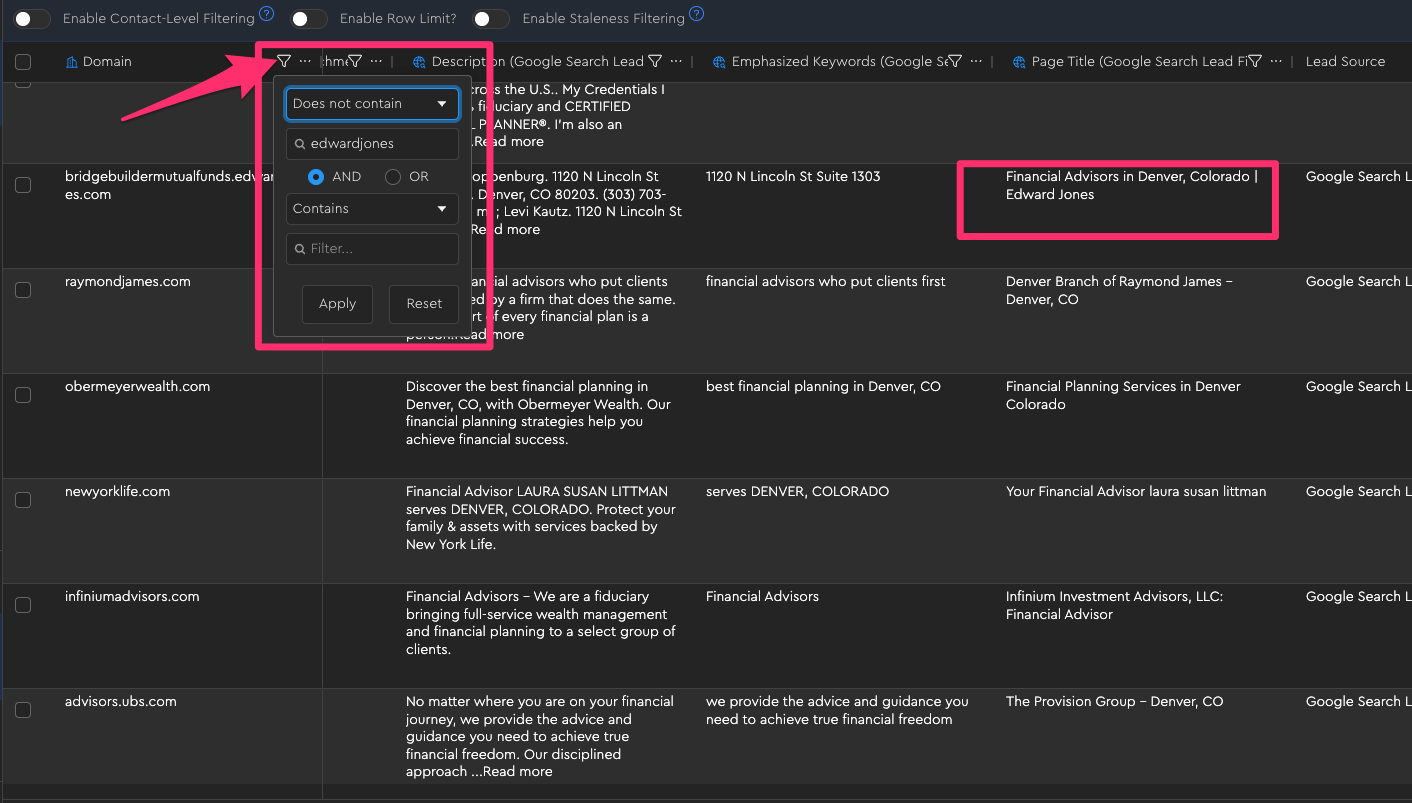
Note that at the time of writing, LeadTables only supports adding a couple filters like this per column, so if that’s still the case when you see this, the way to do more complex “filtering stacks” is to use a “Formula” Data Module where you can output a true/false based on however many rules you want, using Liquid.
(See: “LeadTables Module — Using Liquid Syntax For Deeper Logic”)
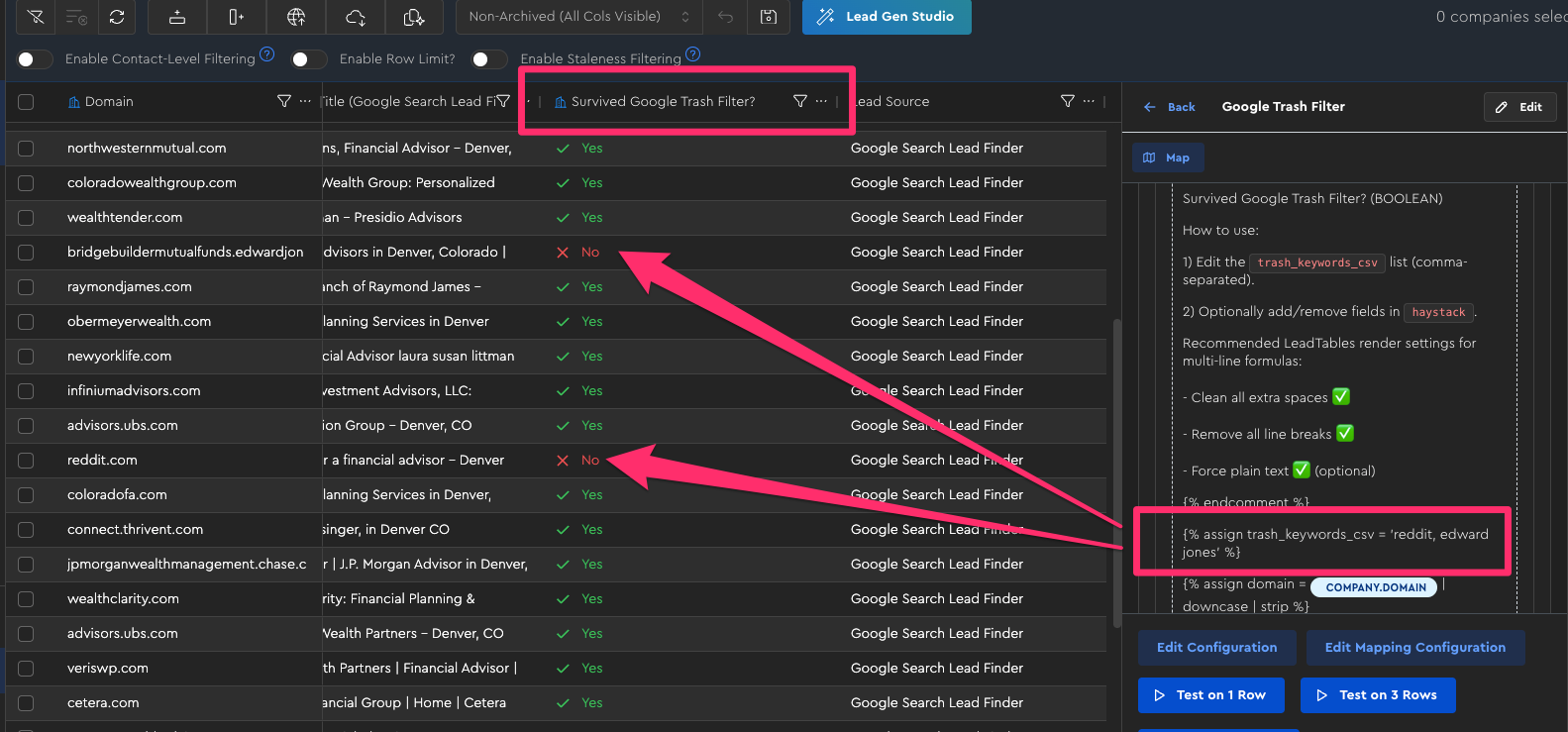
For example, in the “Example: ‘Google Search Trash Filter’ Compound Filter With Liquid” lesson, I used LiquidGPT to help me generate a nifty “compound filter formula” that outputs a simple Survived Google Trash Filter? status like this:
2 — Gather Cheap Economic Fit Info (If Necessary)
If your ICP is really more of a niche, and you work with smaller businesses who don’t have as much money, you don’t need to worry so much about this.
But if you only work with businesses that are quite successful (or specifically AVOID successful businesses), you should have an “Economic Fit Filtering Strategy” going in.
This will most likely mean running the LeadTables “Website Traffic Checker” Data Module to estimate monthly organic search traffic.
If your lead source already supplies trustworthy economic-fit fields, such as employee count or revenue bands, you can use those as optional additional signals without running another enrichment.
3 — Analyze Their Homepage For Qualitative Fit
Once you have your Economic-Fit-Passing shortlist, we need to check which ones are actually your leads.
For example, if in your same Financial Advisors search, this reddit result made it through your first-pass filters, they’d probably also make it through any “minimum employee count” or “minimum website traffic” filters you would have rolled out in the previous step:
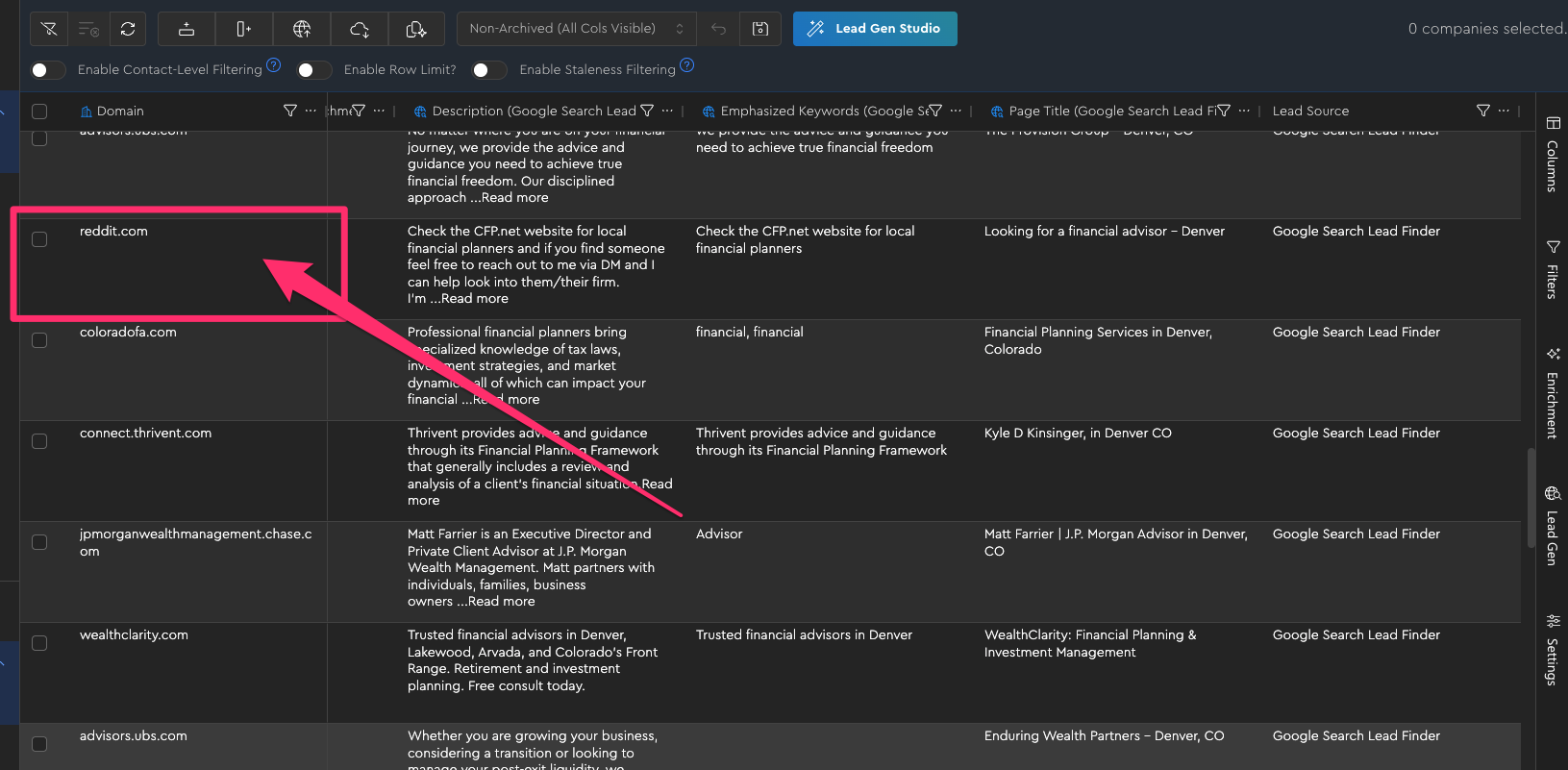
Because of this, we need to ensure Niche Fit / Problem Fit by…
- First scraping their homepages into markdown with the “Webpage To Markdown Scraper” LeadTables Data Module
- Then, analyzing the content of that page for fit with a well-crafted AI prompt, using the LeadTables “AI Table Data Prompt” Data Module
As an alternative, you can also use the LeadTables “AI Researcher” Data Module, but I personally prefer the homepage analysis.