
Apify Tips (“Just The Tips”)
Table of Contents
“Just The Favs” — Our Favorite Apify Actors
Here are some high-performing Apify actors for list-building tasks, sourced by Zach & the $200KF community — hit me up to add your own if you find a goodun!
- BuiltWith Scraper: Extracts detailed tech stack data from websites.
- One-by-one (cheaper monthly subscription, but would need to be called via make automations) canadesk/builtwith
- $0.0013 CPL — Bulk (easier because you don’t need automations) canadesk/builtwith-bulk
- Similarweb Scraper: Enriches leads with web traffic and competitive data.
- $0.0002 CPL — curious_coder/similarweb-scraper (Fav + Cheapest one — good for traffic; but not a lot of data)
- $0.03 CPL — tri_angle/similarweb-scraper (Much more expensive, but LOTS of data)
- Google Search Results Scraper: Scrapes Google search results for relevant information.
- I like it for list-building via Make Automation, but I don’t like it for list enrichment because it’s ineffective and expensive.
- For enrichment, I’d suggest my “Perplexity enrichment via Make” automation
- apify/google-search-scraper
Apify Tips for List Building
Understanding Usage-Driven Billing
You can click the little question mark icon next to a run’s usage to see the cost breakdown. One of the biggest usage-sucks is memory, because the “Compute units” are a multiple of memory * time running. Residential proxies also are an extra cost to keep an eye out for, but RAM/memory is the biggest one.
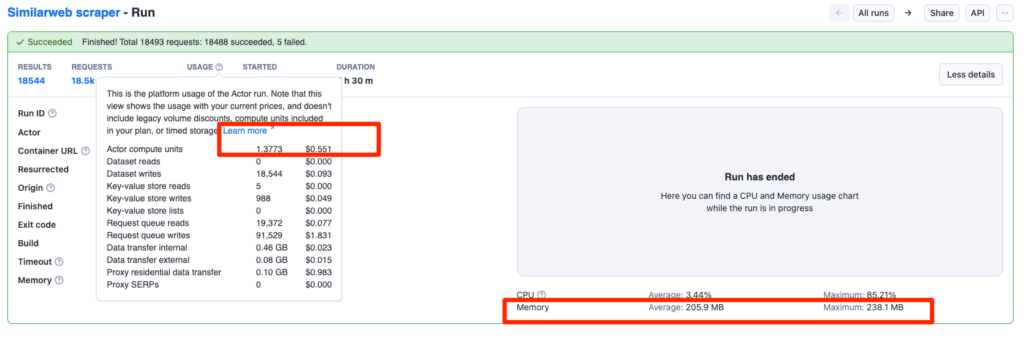
You can optimize this cost by setting the actor’s run setting to not have a much higher ram limit than it’s maxing out at. (Most well-coded actors should default to a low-but-still-safe amount of RAM anyway)
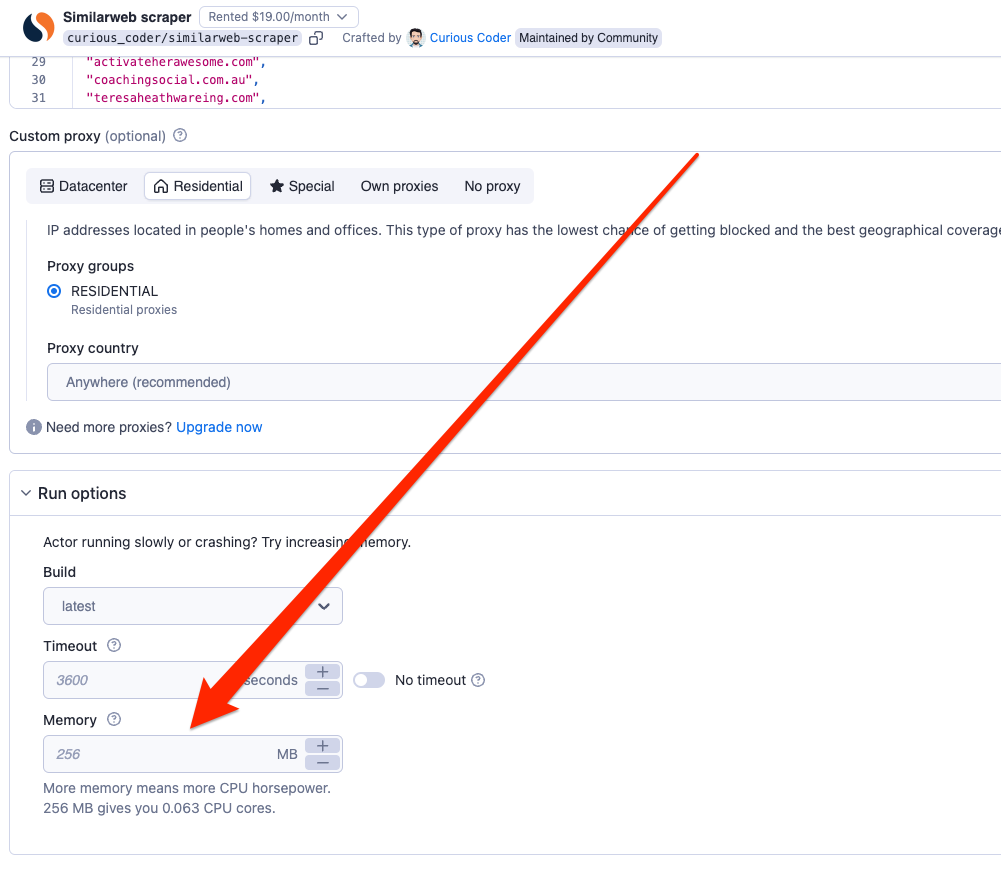
Use Proxies to Avoid Getting Blocked
- Why: Many scraping tasks risk getting blocked by websites, especially when running multiple requests.
- Tip: Ensure you use proxies to rotate your IP address when running tasks at scale, minimizing the chances of getting blocked.
Test Multiple Actors for Efficiency & Optimal CPL From a Test Run of 30-100
- Tip: For the same data source, try out different actors to compare their results and CPL (Cost Per Lead). The efficiency of actors varies, with some delivering much better CPL than others.
- Example: For Similarweb scrapers, one actor may offer a CPL of $0.03, while another could enrich the same leads for $0.0002 CPL (it gives you less data, but if all you care about is website visitor data, why spend the extra money on a huge amount of data you’re not going to use?)
- https://apify.com/curious_coder/similarweb-scraper — $0.0005 CPL
- https://apify.com/tri_angle/similarweb-scraper — $0.03 CPL
Quality and Technical Skill Requirements Vary
- Tip: Not all Apify actors are created equal—some require more technical expertise to configure and troubleshoot than others. Always evaluate the quality and technical demands of each actor before committing.
- Action: Experiment with different actors to understand their ease of use and effectiveness for your specific needs.
Assess Technical Complexity: Bulk vs. One-by-One Actors
- Tip: Actors that allow you to bulk paste domain names or inputs are easier to use than those that require one-by-one runs. If an actor only runs one-by-one, you’ll either need to hire a VA to run it manually (which can be time-consuming), or set up a Make.com automation (which has a higher technical barrier).
- Action: Before selecting an actor, check whether it supports bulk input to avoid potential workflow bottlenecks.
Be Sure to Visit the Apify Profile / Information Page for an Actor for Setup Guidance & Tips
- Tip: Apify actor profiles often contain the instructions and setup guides you need to start using the actor effectively. This is not always intuitive, so make sure to check the profile page for key setup details before running the actor.
- Action: Always review the actor’s Apify store page thoroughly to understand its inputs, limitations, and configurations.
Customize Actors with Input Configurations
- Tip: Many actors allow you to customize inputs to refine your data scraping. Use these configurations to tailor the actor to your exact needs (e.g., geographic targeting, keyword filtering).
- Action: Always explore the actor’s documentation and input settings to ensure you’re getting the most relevant data possible.
Handle Rate-Limiting in Automations
- Tip: When making one-by-one Apify requests from an automation, you may need to introduce a small delay (sleep function) between each request to avoid rate-limiting issues. However, this may not always be necessary as Apify actors typically take a few seconds to spin up, creating a natural delay.
Chap-Sourced Tips:
Zach hasn’t vetted these but they certainly SOUND real!
Understand Data Retention Policies
- Tip: Apify has specific data retention policies—some actors only store data for a limited time. Make sure to download or export your results promptly.
- Action: Set reminders or automate data exports to avoid losing valuable data if you’re relying on Apify’s temporary storage.